

As an HR professional, planning and implementing an effective employee first-day experience should be a priority. Because this step will help reduce new-hire anxiety and set the tone for long-term success.
To ensure a quality first-day experience for new employees, you should plan the first day according to the role. Then, set the right schedule. Follow it with creating solid presentations and completing preboarding activities. And create a useful checklist to track the proceedings.
Key Takeaways
To create a great first-day experience, employers should ensure:
➡️ Proper planning
➡️ Setting the right schedule and timing
➡️ Preparing impactful presentations with the right presenters
➡️ Updated Employee Handbook and/or COC
➡️ Completion of pre-onboarding paperwork and other activities
➡️ Creating a checklist to track proceedings
➡️ Contact the newly hired employees for follow-up
Using effective and advanced HR software like Yosuite, you can improve and expedite your pre-boarding activities before the first day.
Pre-Onboarding Activities for Successful New Hire Orientation
A smooth first day begins well before the new hire walks through the door. Pre-onboarding (or pre-orientation) covers the critical tasks and planning that occur after a candidate signs the offer. But before their official start date.
You will need to plan the proceedings weeks or months ahead. Especially for orienting employees across different roles, regions, and positions.
Read About Quality and Effective First Day Orientation Activities
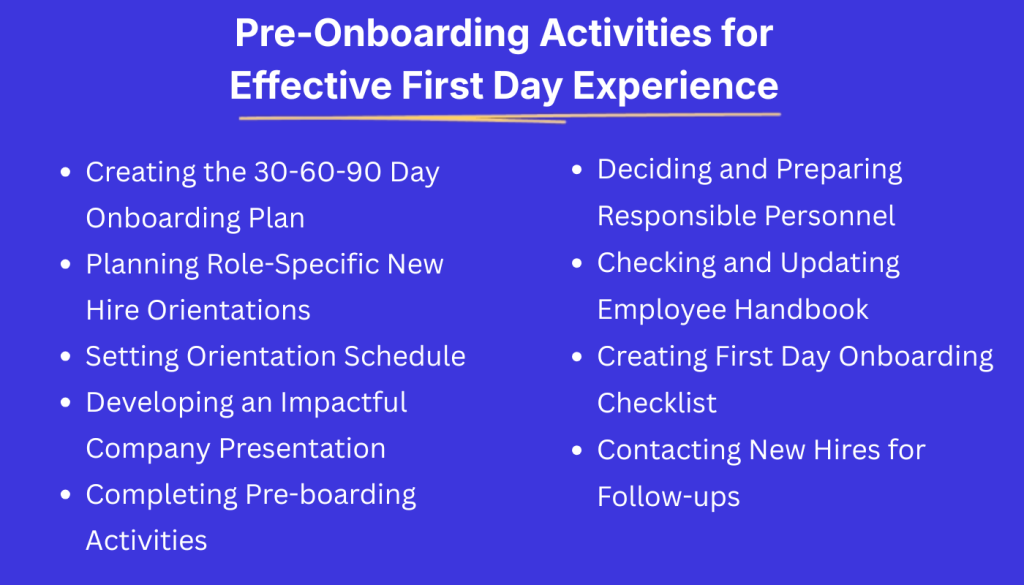
Creating the 30-60-90 Day Onboarding Plan
Think of a 30–60–90 day plan as your roadmap for onboarding and early success. When you invest a bit more time upfront in planning clear goals and milestones, you make the rest of the journey smoother and more efficient for both the new hire and their manager.
The beauty is that once you’ve built a strong onboarding plan, you can reuse it for future employees. Simply tweak it for different roles, while regularly revisiting your documented processes, procedures, and systems to keep everything current and effective.
Planning Role-Specific New Hire Orientations
Plan a role-specific onboarding for the new hire’s role and job duties. This means coordinating sessions and training on the specific tools, tasks, and performance goals specific to the position.
Onboarding an engineer will require a different style of presentation than a salesperson. So you need to develop a first day and perhaps a one week plan with activities specific to that role. For that, you need to thoroughly understand the JD of the role. And consult with the functional heads for better insights about the role and position.
Setting Orientation Schedule
Map out a detailed schedule or agenda for the new hire first day. This should be well ahead of time. Decide on the activities, which topics to discuss, who will lead each session or activity, and how long each segment will last. These include time slots for welcome, HR paperwork, office tour, manager meeting, etc.
The number of attendees (the new hires) and departments covered will play a key role. As many recruits would mean dividing the sessions as per department or mentor.
Developing an Impactful Company Presentation
It is always good to prepare any orientation presentations, slides, or videos that can be used to discuss the company and its operations. This includes the company overview/culture talk and any training modules.
If needed, take assistance from branding personnel. Make these presentations engaging and on-brand. Include visuals, stories, or even a short quiz or game to keep it fun. Make sure to have the right resource prepared to present as per plan. You will need to give the spokesperson at least a few days to prepare the speech for proper delivery.
Completing Pre-boarding Activities
Before the first day orientation, make sure to complete pre-onboarding tasks. Pre-employment work like job offer letters, background checks, medical checks, related skill and culture tests, etc. should be completed. Collecting documents like I-9 forms or W-4 forms should be completed by this time.
Ensure IT creates all necessary system accounts, email addresses, and login credentials for the new hire. If you promised any company swag or welcome gifts, prepare those as well.
Deciding and Preparing Responsible Personnel
Onboarding is a team effort, so decide who will be responsible for each aspect of the new hire’s first day. Coordinate with all relevant departments and individuals beforehand.
For example, you should be ready to cover benefits and policies and ensure any remaining hiring paperwork are completed. Meanwhile, the team lead should arrange introductions with key team members and plan some role-specific training for the first day or week.
It’s also wise to assign an onboarding buddy or mentor. Someone on the team who will greet the new hire and be a go-to for questions in those early days.
You may also want the CEO or someone from top management to briefly interact with the new hires. This will add more value to the first day experience. But for that, you will have to manage the leader and plan what he’ll be talking about.
Checking and Updating Employee Handbook
Double-check employee handbooks so that they are up-to-date. Policies can change, and you want to ensure the new hire gets the latest and correct information on benefits, holidays, or codes of conduct.
Take some time to review your onboarding materials (handbooks, orientation slides, org charts) and refresh any outdated content. Also, customize materials, if needed, to better match the new hires’ roles. For example, create email drafts or messages that pertain specifically to marketers, designers, coders, etc.
Creating First Day Onboarding Checklist
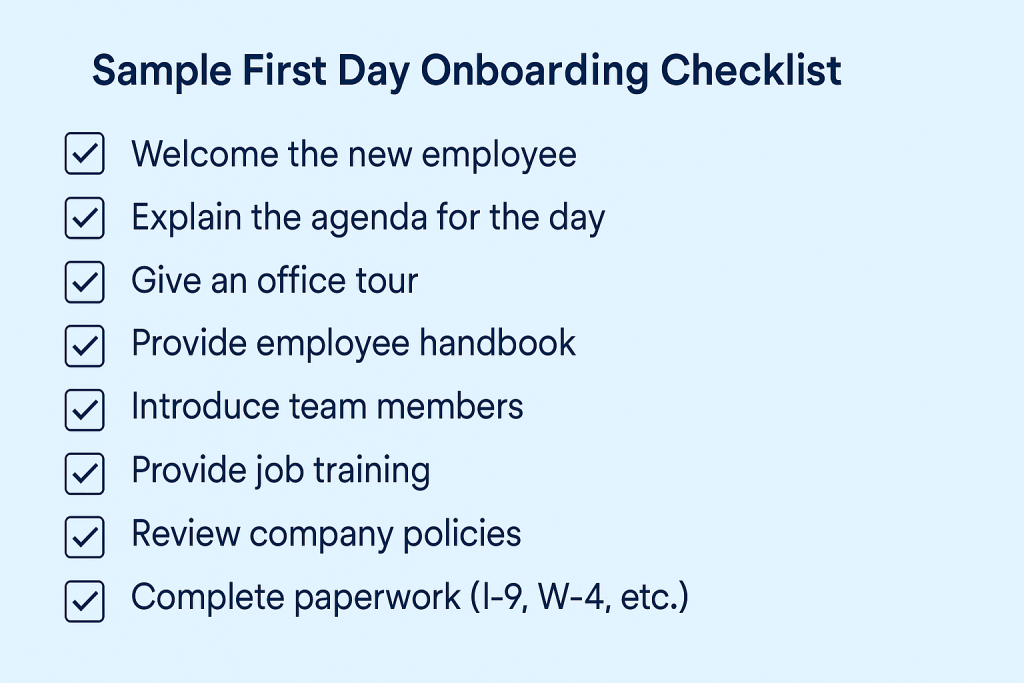
To help keep track of what you are doing and planning, develop a checklist for first-day onboarding tasks. You can create separate lists as per different departments or roles. Or, you can create a generic list that covers common orientation tasks across all roles and positions.
Below is an example checklist of tasks that many companies include on a new hire’s first day.
Contacting New Hires for Follow-ups
Finally, among all the planning and activities, do not forget to reach out to the new joiner. Your follow-up call or email may be a friendly reminder about joining on the first day and what agenda will be covered that day. Or, merely a hello to show a gesture of care about someone who will be joining you to contribute to the company’s success.
Sending the right Welcome Email to the new hire will also set the tone for their first day experience. Check how to executive it properly. 👉 Welcome Email for New Employees
Benefits of Well-Planned Employee First-Day
Investing time and effort into planning a great first day employee experience yields tangible advantages to the organization. Remember, no matter how debatable, a first impression can often be the last impression.
- Reduced first-day jitters and anxiety: When people know what to expect and feel taken care of, they can relax and focus on learning. This boosts their confidence as well.
- Higher engagement and retention: Making that first day, and week, positive and productive pays off in employees who stick around and contribute longer. Companies with a well-structured onboarding process see new hire retention increase by as much as 82%.
- Faster time to productivity: New hires who receive clear guidance, training, and resources on their first day work better in their roles and adapt quickly.
- Stronger employer brand impression: A well-organized thoughtful onboarding experience shows that the company is professional, supportive, and “has its act together. This automatically creates a positive impact on the new hire’s mind.
- Better compliance and fewer mistakes: Covering important policies, safety procedures, and job expectations from the start helps new hires make less mistakes and cause legal troubles. This protects both the employee and the organization.
Using onboarding software for day one
Tools like Yosuite help in organizing an effective first-day orientation. It has features that will assist you in performing onboarding tasks effectively.
The People Module has an Onboarding Feature where you can perform several activities related to orientation.
To create onboarding tasks, go to People > Settings > Onboarding. There, you will get two options under it: task group and Welcome Message.
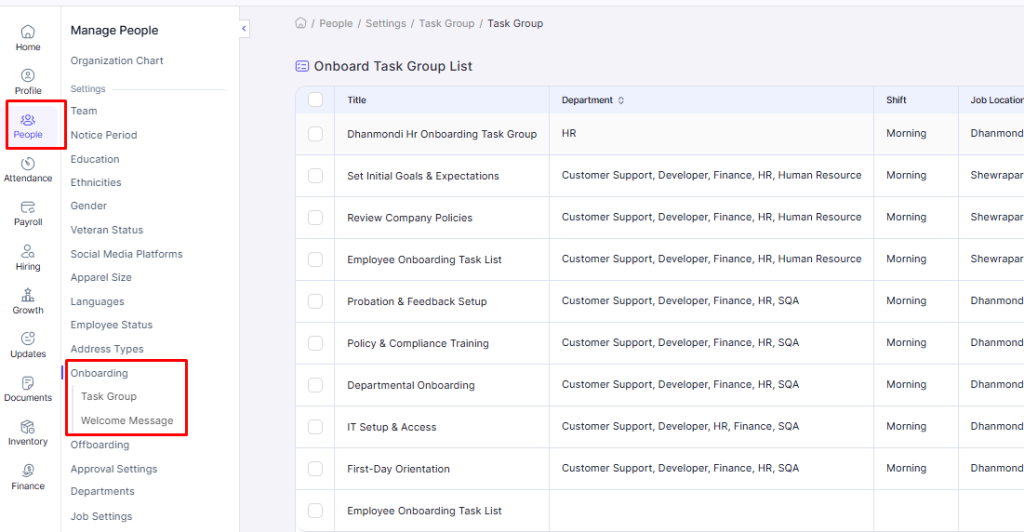
Select Task Group and then Add New. The option will let you create new Onboarding Task(s).
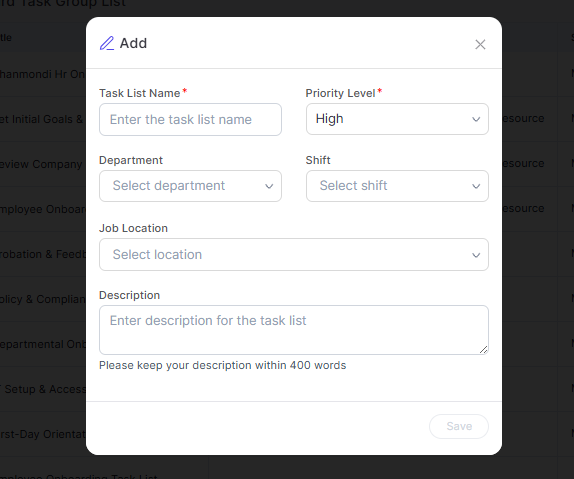
When this popup window shows up, enter the task list name. Here, we’ll type in “Orientation Presentation”. Then set the priority to either High, Medium, or Low. And select for which department the task is. You can also add a shift time if your organization has one.
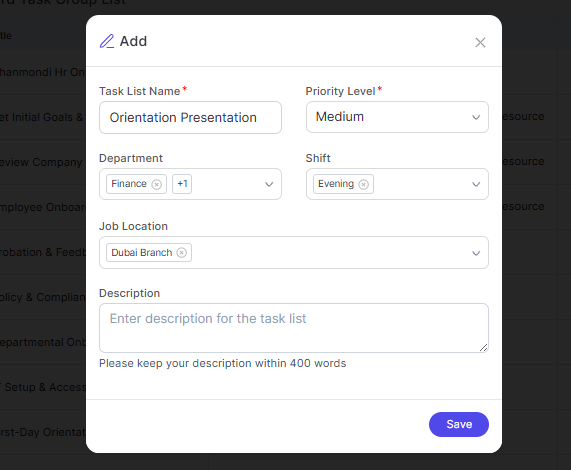
You can add as many locations as you want from the drop-down list. Also, you can add a new location by selecting Add Item.
Finally, you can add some details and explanations (within 400 words) and click Save. You will be redirected to the Task Group List page, where you’ll see the newly entered task.
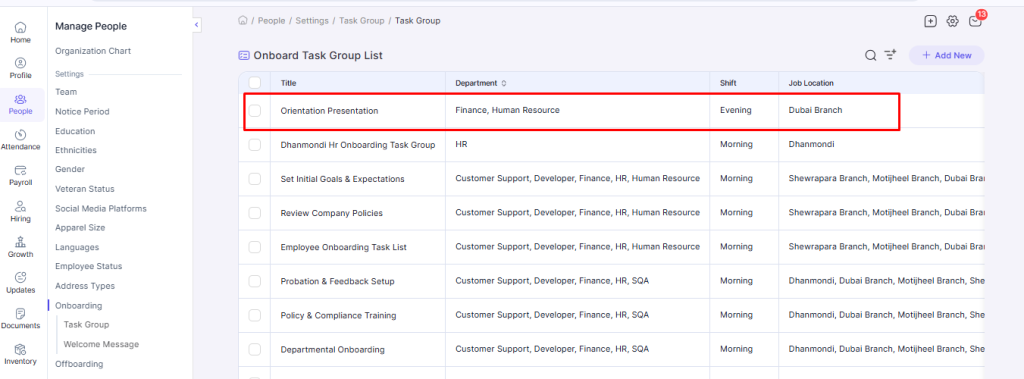
You can also edit the task group by clicking on the name of a task from the list. You will be directed to the window below, where you can edit the details by clicking on Edit.
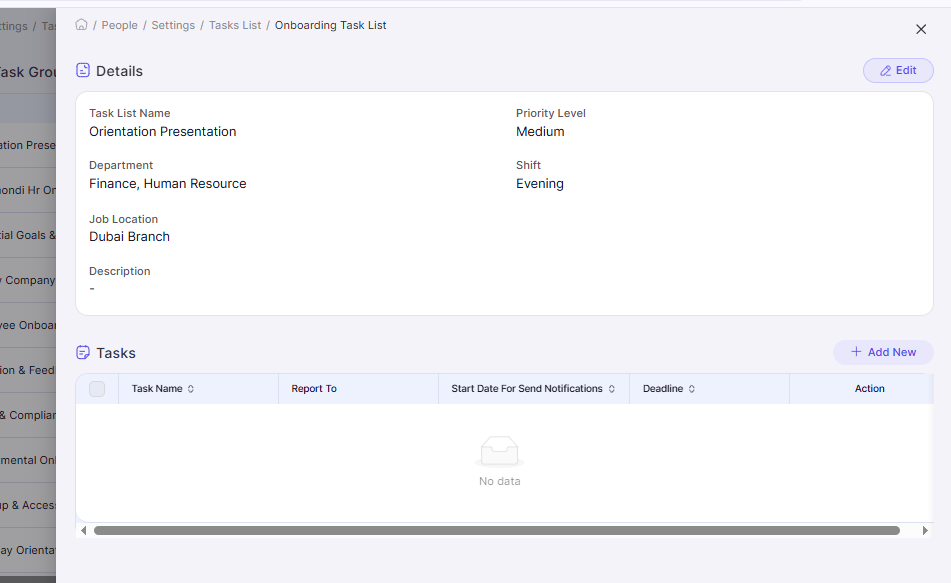
The tool also lets you add individual tasks. On the Details page that slides in from the right, you’ll notice the Tasks section in the bottom half. There, you can add or edit a single.
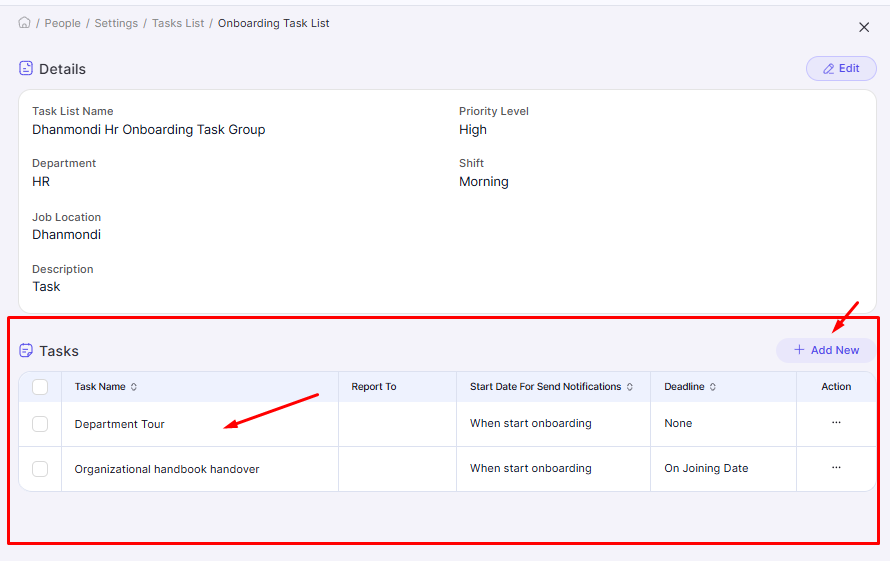
After selecting Add New, you will get options to enter the task name, select a deadline for the task (during or after joining or custom), select the start date, who to report to, and task descriptions. You can also attach relevant files.
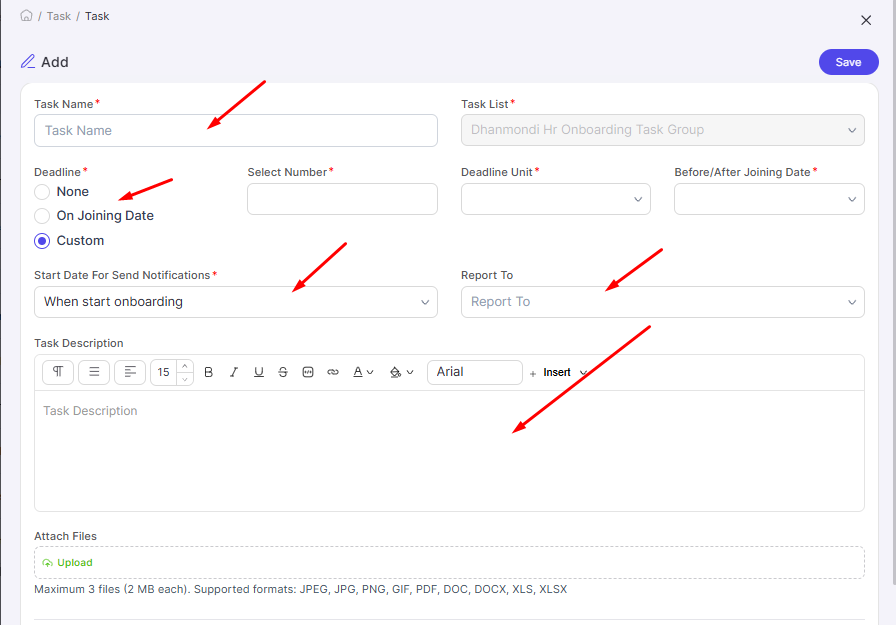
Click on Save to add the task to the task list.
How to Assess Employee First-Day Experience?
After all the effort you put into planning and executing a first day, you must know what went well, or according to plan. And what could have been done better. These moves will help you improve future first employee experiences. So, you will need to document and track the feedback as well.
Ask the new hire directly
You can simply check in with the new hire at the end of their first day or during their first week. Ask open-ended questions like “How was your first day? Is there anything you expected that didn’t happen?”
New hires may feel nervous to say something ‘negative’ right away. So assure them that honest feedback is welcome and will be used to improve the process. During my tenure as an HR officer, I’ve collected feedback from new sales hires at the end of their first day. Yes, they were jittery and doubtful. But I shared a short feedback form with them to assure it was all part of the process.
New hire surveys:
You can create and share an onboarding survey to get structured feedback on the first-day experience. This could be a survey sent a few days or a week after the new hire starts, via email.
Include questions with a rating scale.
- “How prepared did you feel on Day One?”,
- “Were the orientation topics relevant to your role?”,
- “What was your favorite part of your first day?”
And so on. All in a scale of 1 to 10 (from lowest to highest).
You can use HR tools like Yosuite with Feedback Management module to create the surveys or questionnaires and upload it to the system. The new employees can find the forms in the cloud-based HR system and fill it by themselves.
Manager’s perspective:
Get a view of the team lead or department head about how the first day went. They can often tell if a new hire seemed engaged, overwhelmed, apathetic, or struggling. The manager might notice the new hire was quiet during team introductions. This can indicate some nervousness or that the team could do more to be welcoming.
Track early indicators:
Besides surveys, check the following:
- Did the new hire complete their first-day tasks and training?
- Were all forms submitted correctly?
- Was everything on the onboarding checklist done without issues?
- Is the new hire pumped for the following day?
If you notice any new hires quitting or disengaging within the first weeks, that’s a red flag to examine your onboarding process more closely.
FAQs
How can I effectively prepare an employee first-day experience?
Can I use HR tools for effective employee first day experience?
What is the role of HR managers in ensuring a successful employee orientation?
Summing Up
Well-organized pre-boarding preparation and an engaging orientation makes a new hire’s first-day exciting and useful. Focusing on personal welcomes, clear information, and team integration helps create a positive, memorable experience on the first day.
The full onboarding process can take up to 90 days. So you should focus on how the first day experience will help the new employee move along the onboarding trip. Use onboarding software and checklists to keep things on track, and always gather feedback to improve your process.
Leave a Reply