

As someone working in the HR department, you will need to perform orientation sessions for new hires whenever there is a recruitment. Orientation during onboarding helps new employees transition better into your company.
So understanding how to implement orientation, especially on the first day, is critical for making a positive first impact. And ensuring higher chances of new hire retention. In this blog post, I will guide about the strategies of performing a more effective first day orientation for quality onboarding of new hires.
Key Takeaways:
➡️An effective first day orientation sets the tone for rest of the onboarding process.
➡️New hires must have handbooks or materials that explain company culture and policies.
➡️The team members need to meet with the new employees on the first day.
➡️A powerful presentation discussing about company values, goals, and culture helps new hires blend with the workplace.
➡️HR managers should make sure IT onboarding for new employees are at least started, if not completed, by the first day.
➡️New hire paperwork should be completed by the first day, unless there is some kind of legal blocker.
➡️Using HR software or tools will help expedite the process.
What is New Hire Orientation?
Orientation of newly hired employees involves introducing them to their role, the company, and the workplace culture. It happens on day one of the new hire. It begins with something as simple as a handshake with the new hire. And culminates in introducing them to their workstation and team members.
Importance & Benefits of Employee Orientation
You need to ensure a proper orientation at all costs! It is the first impression of the employer for the new employee. So you have to get it right in setting the stage for the newly hired.

Real Company Example
A proper orientation ensures:
- New hires know what they are expected to do and how they should behave
- An environment of comfort and ease, especially for recruits entering their first-ever job.
- Chances of errors at work are reduced
- Better team bonding as the employee gets to know a bit about their team members
- New employees are introduced to their job-related tools and accessories.
- You can better retain the employee for the next few months as they become more oriented with their role and the organization.
Strategies to Better Perform First Day of Orientation
How you treat and introduce new hires to your company depends completely on you. Best practices of first-day onboarding vary from company to company. Affected by regional culture, company culture, industry practices, organization size, and budget.
But executing an ideal first-day orientation with perfection will depend on how well you can delight your new hires. Your “clients” of an onboarding process.
Personalized New Hire Welcome Email or Message
A great orientation begins with a warm new hire welcome email or message. You can send the message/email a day or two in advance with all the info they need for the first day. Or, you can email them a welcome message on the day of arrival, with greetings, motivational words, some friendly instructions, etc.
However, I suggest you have their official email or WhatsApp/Teams/Slack/Discord, etc. account set up before the first day. So that you can send the welcome message directly to their office communications platform on the first day. This will expedite both the IT onboarding for new hires and your orientation.
Also, make sure you add a line to your email that allows them to ask any questions regarding their joining or orientation.
Sample Welcome Email for New Hire
Subject: Welcome Onboard, (Name of New Hire)
Hi (Name of new hire),
We’re excited to welcome you to (Company Name)! Everyone here is happy to have you on board, and we’re looking forward to working together for a fruitful and worthwhile journey ahead.
Here’s how your first day at the office will play out:
9:00 AM — Welcome & Introductions (I will meet you at your desk to kick off your day).
9:30 AM — Orientation (We’ll go over key policies, your employee handbook, and help finalize any remaining documents)
11:00 AM — Meeting with IT team who will assist you with your email, tools, and system access.
12:30 PM — Team Lunch/Virtual Meet & Greet
2:00 PM — Role Overview & Expectations (You HOD Name will walk you through your responsibilities and initial plans/goals)
Once again, welcome to our company, (Name of new hire). Wishing you a fantastic first day!
If you need anything throughout the day, feel free to reach out directly.
Thanks & Regards,
(Your Name)
(Your HR designation)
(Contact Details)
Smoothly Handing Out the Employee Handbook
You would want your new employee to understand the company code of conduct (COC) and policies from day one. Share the rules, policies, and COC through email or via hard copy (if available).
You can attach the soft copy (preferably in PDF format or via Google Drive link) to the Welcome Email. Or, you can send a separate email with the handbook.
Regardless of how you share the employee handbook and policies, you must explain the clauses to the new hire, preferably on day one. It could be as a presentation during a session or a one-on-one meeting.
For remote employees, I recommend recording a virtual guide and attaching it with the introduction email. Along with the soft copy of the employee handbook.
Introducing Team Members
An employee wants to feel safe and comfortable from the first day. So, you must ensure new hires get introduced to the team members they will be working with. And you should do it on the first day. This will help them get acquainted with their working partners from the getgo.
Many companies also schedule a casual team meet-and-greet or group lunch on the first day. This helps everyone become more comfortable with each other in a relaxed setting.
Besides the internal stakeholders or employees of the company, you can also introduce the new hire to clients/vendors they may have to work with. This especially happens in agencies or service-related companies.
For instance, a newly recruited Marketing Manager of a digital marketing agency would ideally get acquainted with their client(s) within the first two days of onboarding. It is an important step toward ensuring a strong client-agency relationship.
Company Culture Presentation
Glassdoor conducted a widely known survey on company culture and found out that around 80% of employees “consider a company’s culture” before applying. And more than 50% chose good workplace culture over a good salary!
These couple of stats show why you should focus on creating a company culture that attracts. And more importantly, introduce your company culture equally well to the new ones.
You and your HR team can prepare an engaging company culture slideshow as part of orientation. It can cover the company’s mission, vision, core values, history, and briefs about the services/products.
You can share a short video by the owner or CEO of the company talking about the success story. Even better, you can have the CEO take some time out of his busy schedule to share a few words of wisdom with the new hires. This will make the new employee feel more valued, coming face to face with the head of the table on day one!
Assigning Mentors or Buddies
One good practice is to pair a new hire with a buddy or mentor. They are an experienced colleague who can show the new employee around and be a go-to person for questions.
Introduce the new hire to their assigned buddy and have a brief sit-down together. The buddy can take the new hire to lunch or give an “unofficial” tour from an employee’s perspective. This practice helps newcomers tackle the social and practical aspects of a new workplace during the early days.
Expediting New Hire Paperwork Requirements
Another key activity HR personnel must perform perfectly during orientation is collecting the required employment documents. These include, but are not limited to:
- Joining Letter
- Academic/Experience Certificates
- Signatures/acceptance on Non-Disclosure Agreements
- Employment Eligibility Forms, like I-9
- Tax forms/Payroll Forms, like W-4 or W-2
- At-Will Employment acknowledgements
- Bank Account direct deposit details
- Emergency Contact info, etc.
Want to know about what the paperwork to complete during onboarding and how? Read More!
Immediately Start IT Onboarding Process
Begin requisitioning and setting up IT and office software-related work for new employees well before the first day. You should ensure the employee has their laptop or equipment, login credentials, and access to all necessary software and systems at least during the first day of onboarding, if not before.
Have your IT department (or an HR IT specialist) walk the new hire through setting up their computer, email account, ERP/software access, and any work-related applications they’ll be using. Confirm they can log in to important systems like the company intranet, HR portal, project management tools, etc.
For remote employees, arrange virtual training sessions. Or send an IT support to their location, in case of setup issues.
Orientation is also a good time to cover basic cybersecurity training (e.g., password policies, phishing awareness) and any IT usage policies (like rules for using work devices or cloud systems). If the employee has to use role-specific tech tools like Salesforce, Yosuite, Semrush, etc., you might give a high-level demo or schedule formal training later.
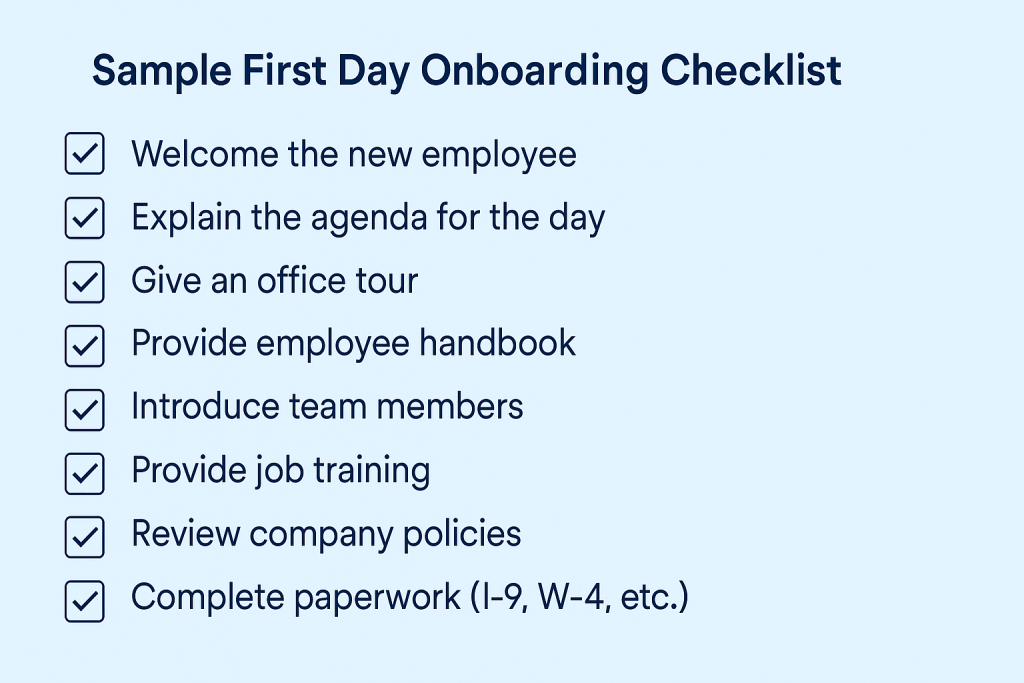
Sample First Day Onboarding Checklist
Below is an example checklist of tasks that many companies include on a new hire’s first day. You can customize this for your own organization, but it provides a sense of the typical to-do items to cover.
Using an HR Onboarding Tool for Effective Employee Orientation
Tools like Yosuite help in organizing an effective first-day orientation. It has features that will assist you in performing onboarding tasks effectively.
The People Module has an Onboarding Feature where you can perform several activities related to orientation.
To create onboarding tasks, go to People > Settings > Onboarding. There, you will get two options under it: task group and Welcome Message.
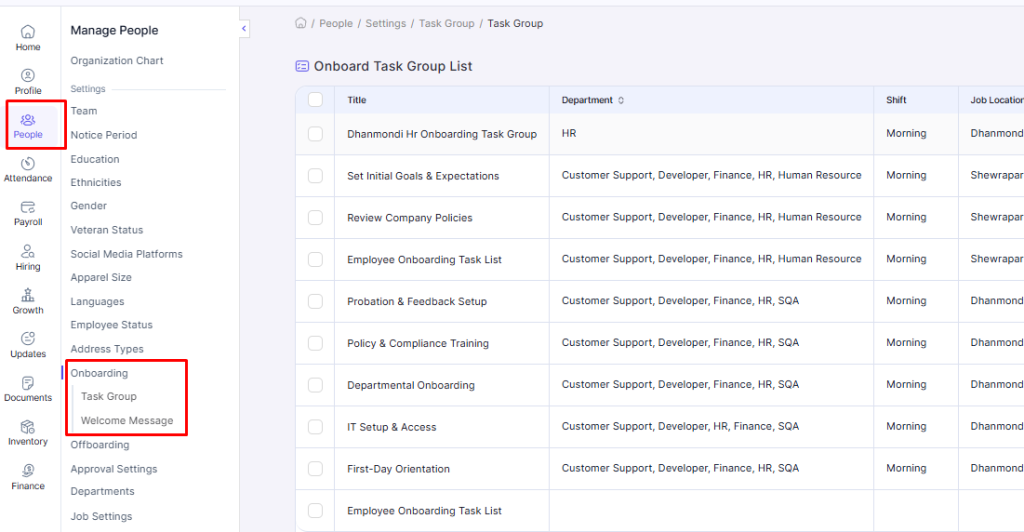
Select Task Group and then Add New. The option will let you create new Onboarding Task(s).
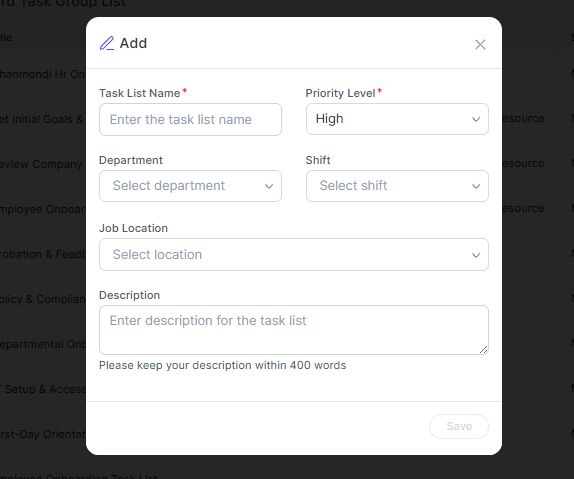
When this popup window shows up, enter the task list name. Here, we’ll type in “Orientation Presentation”. Then set the priority to either High, Medium, or Low. And select for which department the task is. You can also add a shift time if your organization has one.
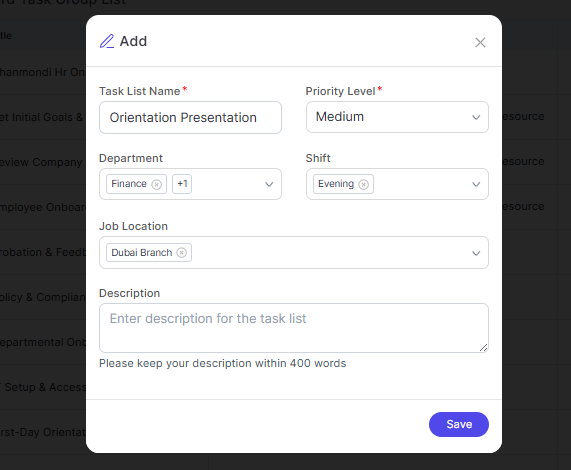
You can add as many locations as you want from the drop-down list. Also, you can add a new location by selecting Add Item.
Finally, you can add some details and explanations and click Save. You will be redirected to the Task Group List page, where you’ll see the newly entered task.
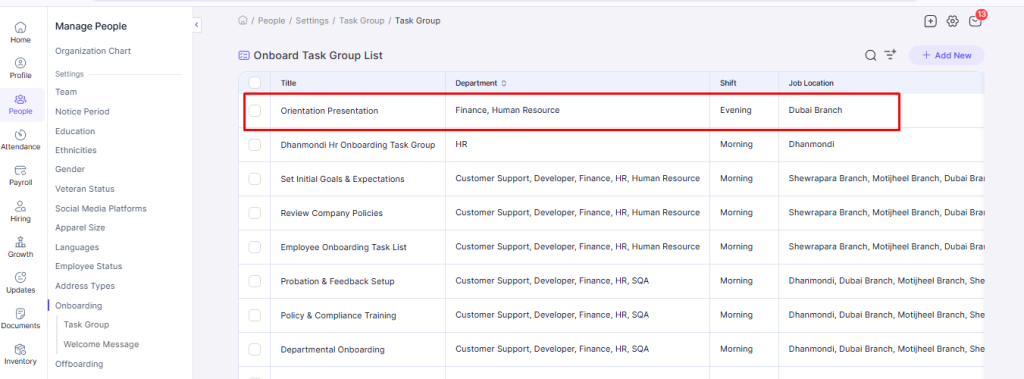
You can also edit the task group by clicking on the name of a task from the list. You will be directed to the window below, where you can edit the details by clicking on Edit.
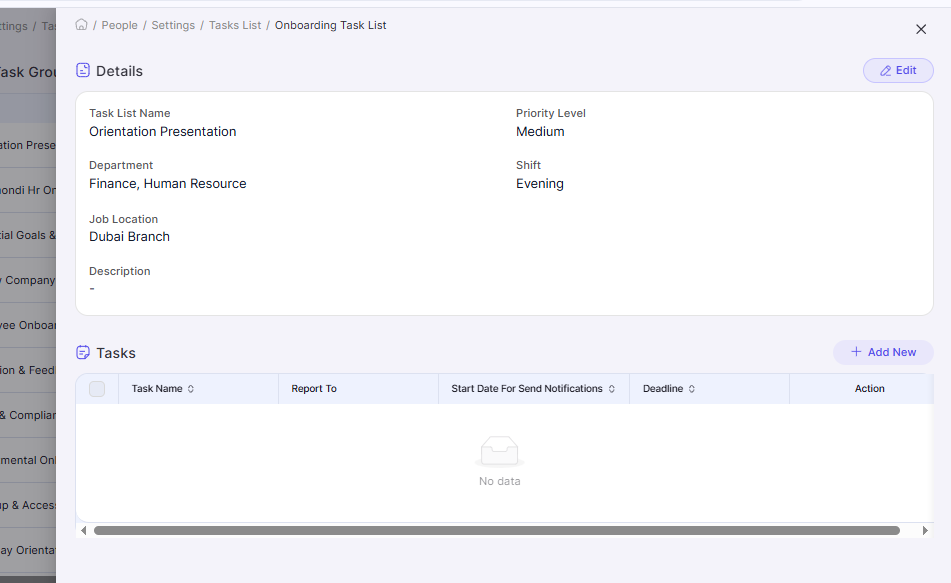
The tool also lets you add individual tasks. On the Details page that slides in from the right, you’ll notice the Tasks section in the bottom half. There, you can add or edit a single.
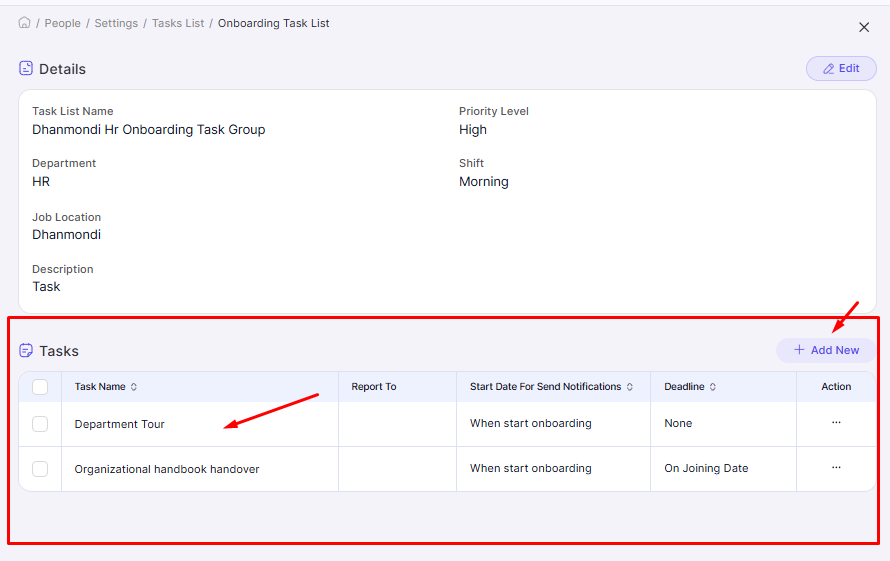
After selecting Add New, you will get options to enter the task name, select a deadline for the task (during or after joining or custom), select the start date, who to report to, and task descriptions. You can also attach relevant files.
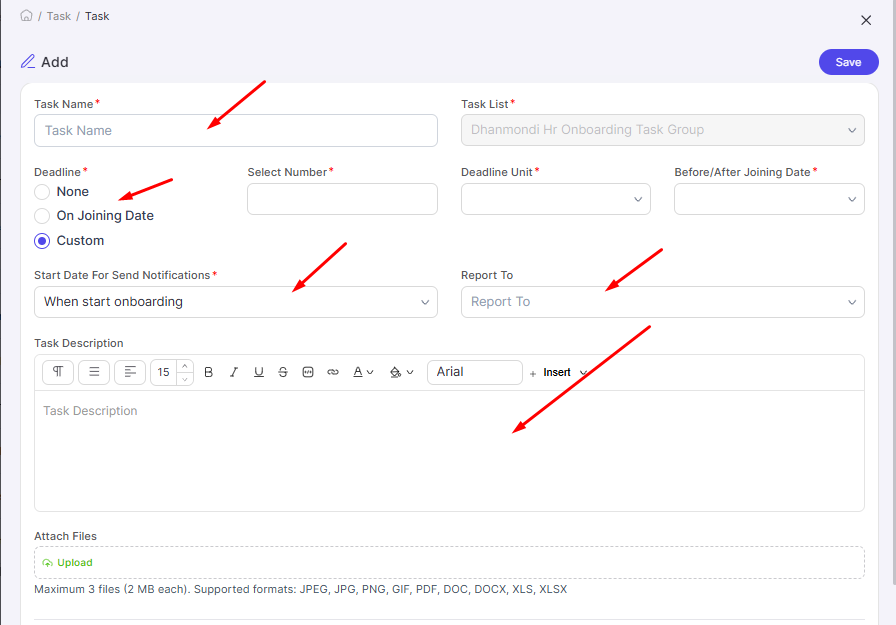
Click on Save to add the task to the task list.
Challenges of First Day Orientation
You might face some common challenges on the first day of orientation. If you are aware of these pitfalls, you can mitigate them and improve your orientation program continuously.
- Information overload: New hires may receive too much information in one day, making it hard to retain key details. This can leave them confused or overwhelmed early on.
- Lack of role clarity: Sometimes orientation focuses on general policies but misses role-specific expectations. This leads to uncertainty about responsibilities in the first week.
- Engagement issues for remote/hybrid hires: Virtual orientations can feel impersonal, making remote hires feel disconnected. Technical issues may also disrupt their experience.
- Poor coordination and preparation: Missing equipment, unprepared presenters, or unclear schedules create serious obstacles. This also creates a negative first impression for new hires.
- First-day nerves and social anxiety: New hires usually feel anxious when meeting many new people at once. This often makes them feel nervous to ask questions.
- Time and resource limitations: Small HR teams or SMBs may struggle to deliver a polished experience. This can result in rushed or inconsistent orientation sessions.
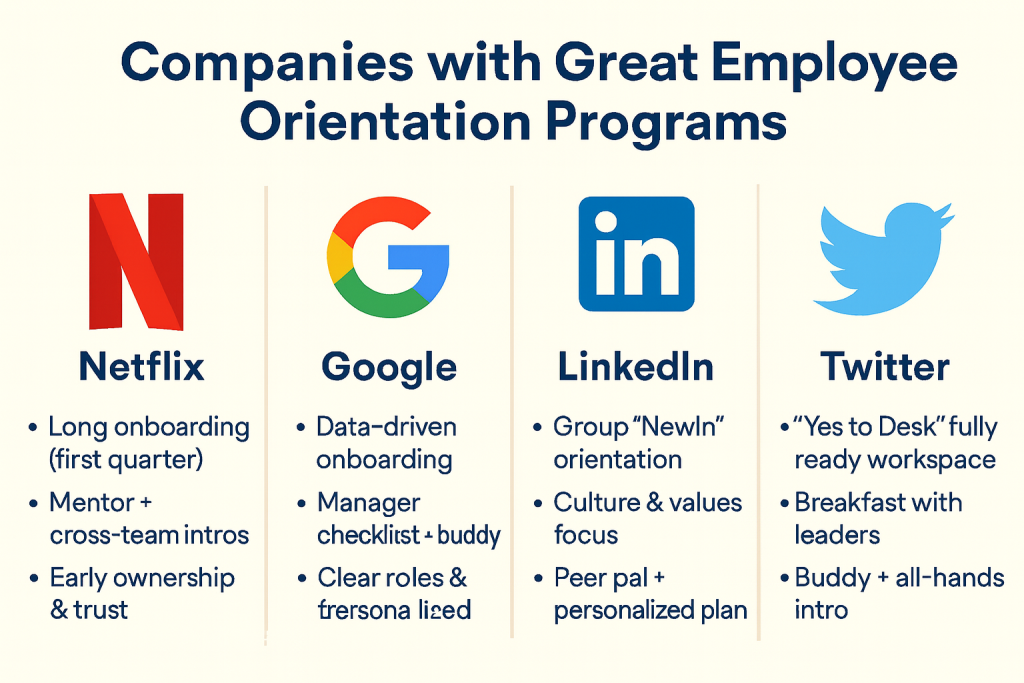
Companies with Best Employee Orientation Programs
Some renowned companies deliver outstanding orientation and onboarding experiences. These organizations treat orientation not as a check-the-box task, but as a strategic and memorable introduction for new employees.
FAQs
How long should first day orientation last
Anything shorter risks skipping important information; anything longer tends to cause information overload. It’s often better to keep Day One focused and then continue orientation modules into the rest of the first week.
What should be included in a first day onboarding checklist?
-Warm welcome and agenda review
-Office or virtual tour and team introductions
-Company overview (mission, values, culture)
-Employee handbook and key policy review
-New hire paperwork (tax forms, direct deposit, right-to-work docs)
-IT setup (devices, accounts, security basics)
-Role overview with the manager and early goals
As long as you cover people, policies, and tools, you’re on the right track.
Who should participate in employee orientations, besides HR personnel?
Summing Up
It’s your responsibility to ensure the first day orientation of new hires is top-notch. From what welcome message you give to how you present the organization, all matters in creating an impact with the orientation session. So make sure all aspects of onboarding are well-executed.
If needed, use HR tools like Yosuite for improving the different elements of employee orientation. And get your work done in quick time with better results and employee satisfaction.
Leave a Reply