

Choosing an HR software for healthcare organizations like hospitals and clinics depends how well they meet industry-specific requirements. To choose the right HR solution, check for factors that help maintain shift-scheduling, compliance issues, proper document management, smooth onboarding, etc.
I will guide you about how to choose HR software for different medical and healthcare institutes. You will also learn how the software features are customized for hospitals and other healthcare organizations. And get a quick walkthrough of using an HR tool for medical teams.
Key Takeaways:
To choose the right HR software for your Healthcare organization, check if the software provides the following features:
➡️ Shift Management
➡️ Payroll Management
➡️ Hiring & Onboarding
➡️ Compliance Management
➡️ Document Management
➡️ Performance Tracking
➡️ Employee Training
➡️ HR Data Tracking
The HR software should help comply with the local laws, meet industry requirements, be affordable, aligns with your organization services & functions, and is right for your company size.
What Makes HR in Healthcare Different?
Strict compliance with medical practices and hospital operations are the key differentiating elements of HR software in the healthcare industry. HR managers work under laws like the Health Insurance Portability and Accountability Act (HIPAA) and OSHA regularly. Violations of these can lead to fines up to $1.5 million per year.
HIPAA-compliant HR software protects sensitive employee and patient information. HR must also track mandatory safety training (OSHA), credentials, and other compliance requirements to avoid legal penalties.
Another key issue HR faces is the high-pressure workforce dynamics. The frontline staff and nurses tend to leave frequently, creating workforce shortages. As per the NSI 2025 report, U.S. hospital employee turnover averaged 18.3%, with registered nurse (RN) turnover at 16.4%.
On top of these, 24/7 operations and complex scheduling of the staff set healthcare apart. Hospitals never close, and a large hospital might manage hundreds of different staff rotations and shifts for doctors, nurses, technicians, and support staff.
How to Choose HR Software for Healthcare?
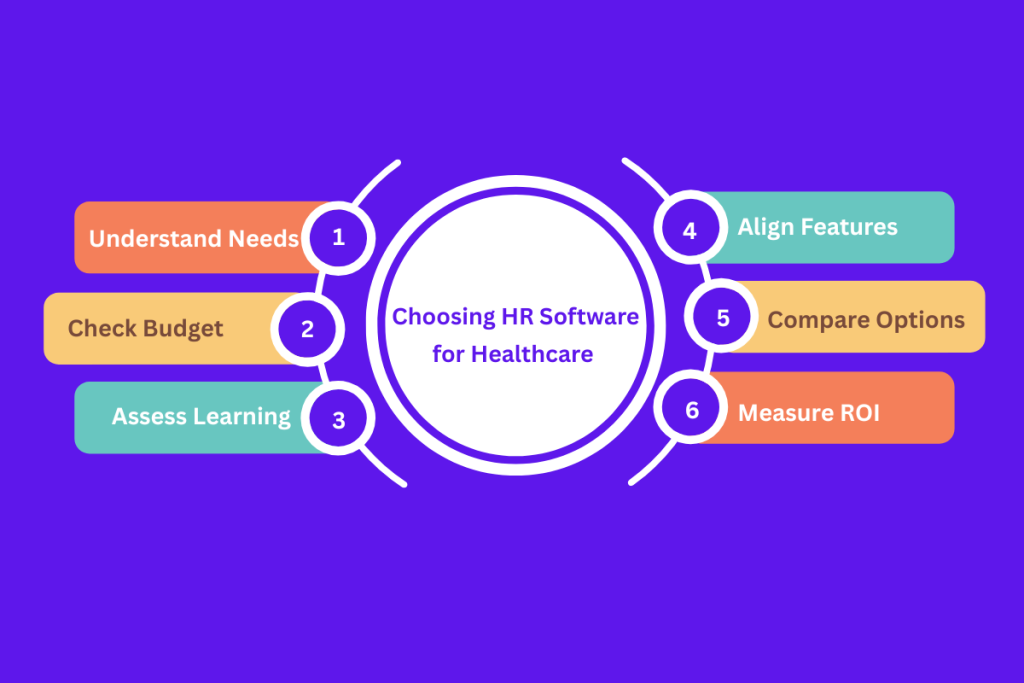
To choose an HR solution for your healthcare company, you need to analyze your operations well. And choose the solution that fits best with your daily work requirements. Maintaining local compliance and best practices.
Understand the Determining Factors
First, you need to consider important factors like industry-specific HR functions and budget before buying an HR software solution for a hospital, clinic, or other healthcare facility.
- Shift-scheduling Capabilities: the HR software must be able to provide features and functions that help you manage shifts year-round. By ensuring compliance with local labor laws.
- Workforce & Organization Size: The number of workers and services you offer determine whether you would need a simple or highly sophisticated system..
- Your budget: It is the total cost of availing an HR software. This includes license or subscription fees, implementation costs, training, support, and future upgrade expenses.
- Ease of learning: tech skills of your HR staff and other employees will vary, so any new tool must be reasonably easy to learn and adopt
- HR Workload: It must help reduce administrative and routine tasks.
- Key software features: Look for key HR functions like payroll, hiring, attendance, compliance, along with other features like analytics, engagement tools, feedback management, document management, etc.
Comparing the Options
Next, research your options well. Conduct a comparison of shortlisted HR software options. Also learn about vendors that specialize in healthcare HR, as well as popular HRIS or HRMS used across industries.
Compare software options by looking at feature checklists, demos, independent reviews, and case studies. Look for:
- The key features for healthcare you need
- Effective compliance support by vendors which includes a Business Associate Agreement for HIPAA
- Integration capabilities with your payroll system, time clocks, or even the EHR for employee data
- Scalability and customizability
- User feedback and testimonials
Also pay attention to areas where one option might have an edge. Perhaps one offers a built-in OSHA training tracker or nurse scheduling app. Whereas another might require third-party add-ons for those.
Ensuring Local Compliance
Then, check whether the healthcare HR software helps ensure strong compliance. This includes tools to track mandatory training and certifications (like annual HIPAA privacy training, OSHA safety courses, COVID-19 control, etc.). And to document that every employee has completed obtaining the certificates.
The software must help HR ensure HIPAA compliance for any HR data that might include health information. Including Protected Health Information (PHI) related to employees (like results of employee health screenings). The system can assist by enforcing role-based data access and maintaining audit logs of who viewed or edited sensitive info.
Measure future ROI
Finally, you should also try to project the future ROI of the HR software options. The software should make HR processes more efficient and effective. Notably, some hospitals using AI-driven scheduling saw nurse overtime drop by32% and staff satisfaction rise 27% within six months.
Make a list of what you want (time saved in admin work, reduction in errors, lower turnover %, etc.). And possibly assign a dollar value or KPI to each. This exercise will clarify which HR software is the most affordable and cost-effective in the long run.
Key Features of HR Software in a Healthcare Company?
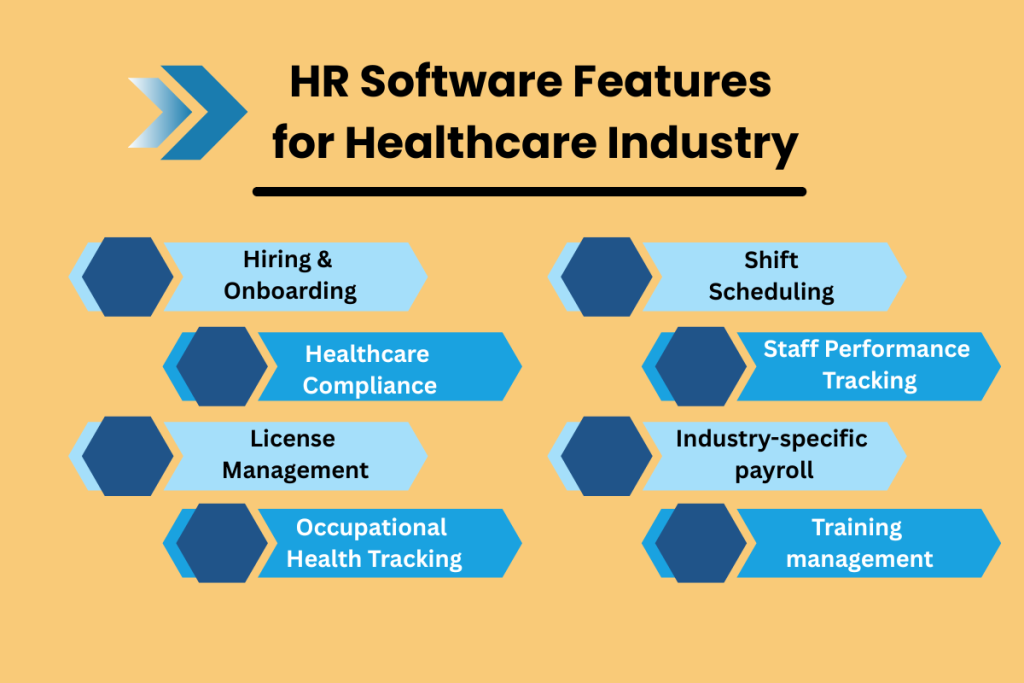
The key features you should look for when evaluating HR software for a healthcare setting, should make the system effective. Hospital HR systems need to handle all standard HR functions plus the special requirements of healthcare HR.
Hiring & Onboarding
Hospitals and medical institutes need highly role-specific recruitment and new employee onboarding features. It would be best if an integrated Applicant Tracking System (ATS) were present to manage job postings, application collections, CV screening, progress tracking, and candidate communications efficiently.
Automated onboarding improves the new hire experience and also saves significant time. Some key elements you should look for:
- Electronic forms (for policies, I-9, direct deposit, etc.),
- E-signatures,
- Task reminders for both HR and the new hire,
- And integration with credentialing systems.
Medical Staff Verification & License Management
Healthcare HR systems must offer strong license and credential management for medical staff. Your software should maintain a database of each employee’s
- licenses (e.g., RN, MD, radiography license),
- certifications (BLS/ACLS, specialty certifications),
- privileges and
- credentialing status, if applicable.
Also, HR software should assist with OIG exclusion list checks and other sanction screening. Modern compliance software allows HR to integrate the OIG LEIE exclusion search into onboarding and ongoing workflows. This helps automate checks for excluded individuals when hiring new staff or doing periodic audits.
Shift Scheduling
Effective shift scheduling is the backbone of healthcare workforce management. So an HR software MUST include this feature for handling 24/7 hospital schedules, rotating shifts, and complex staffing rules.
Nurse shift-scheduling tools should support self-service features too. This will help nurses swap shifts or bid for open shifts via a mobile app. And the manager can approve it online. Healthcare shift differential pay rules, like extra pay for evenings, nights, weekends, or overtime beyond a certain hour threshold, should be automated in the system as well.
Industry-specific payroll
An HR or payroll software must handle data of full-time, part-time, per diem, and contract workers. Some clinicians are paid hourly; others are salaried with incentive bonuses. And some roles might be paid per procedure or encounter (for example, therapists or surgeons billing per patient).
The software should be able to calculate diverse pay structures accurately. These can include multiple rates for one employee and automatically apply overtime rules and shift differentials. For instance, a nurse who works in two different units at different rates.
Staff Performance Tracking
Employees in healthcare range from surgeons and residential nurses to technicians and support staff. With roles having different evaluation criteria, HR software must be able to standardize and smooth staff performance tracking.
The software should help you in
- goal-setting,
- periodic evaluations,
- peer or 360-feedback tools,
- the ability to tie competencies or patient care quality metrics into appraisals.
HR analytics come into play here too. The software should provide analytics on performance and turnover. This would help HR managers identify correlations. Like between units with better engagement scores and lower turnover.
Check out the top performance tracking solutions you must try for better performance management!
Training management
Continuous training is a way of life in healthcare. The training initiatives focus on different topics like annual competencies or new technology training. All to keep up with medical advances.
Therefore, HR software should include or integrate with a learning management system (LMS) or at least have strong training management features. This allows HR to assign, track, and report on employee training.
Some key functionalities include:
- Tracking mandatory training (e.g., HIPAA training, OSHA safety courses, infection control, CPR certification renewals),
- delivering e-learning modules
- linking to external training content,
- and recording completion status.
Some systems offer OSHA training tracker dashboards. These let you take a glance at completion levels required for safety training. Essentially, training management in a healthcare HR system should make it easy to
- deploy required training,
- monitor compliance,
- and support the ongoing education
Occupational Health Tracking
Healthcare workers face various occupational health requirements and risks. So having HR software that supports occupational health tracking helps a lot. This feature set can act like employee health record software for your workforce, separate from patient records.
It should track immunizations and health screenings for employees. These include annual TB tests, hepatitis B vaccinations, flu shots, COVID-19 vaccinations, and any titer or antibody tests required for clinical staff.
Success Stories with HR Software in Healthcare Industry
Story 1:
Ellis Medicine, located in New York with an employee base of 2,700, modernized its onboarding with a healthcare-specific HR tool. They reduced the time from offer acceptance to a nurse’s first day from over 100 days to just 14 days (an 89% decrease in onboarding time) and virtually eliminated new hire “ghosting,” with 99% of accepted candidates actually starting the job.
Automating background checks, electronic forms, and coordinating tasks through the platform led to a faster, smoother onboarding process and ensured units weren’t left short-staffed for months waiting on hires.
Read more about the story > clickboarding.com
Story 2:
A large hospital, Northside Hospital, adopted an HR case management platform to handle employee HR inquiries and issues. The change boosted HR service team productivity and created a more positive employee experience.
With a centralized HR helpdesk system integrated with their HRIS, Northside’s HR team could track and resolve employee requests more efficiently, eliminating duplicate cases and ensuring no inquiry fell through the cracks. HR staff saved time, which they reinvested into personalized support and strategic initiatives, ultimately helping the 30,000-employee organization run more smoothly.
Read the story > blog.dovetailsoftware.com
FAQs
How can an HR software help with onboarding in Healthcare?
What is the most important feature of shift management?
What is an employee health record software used for?
Summing Up
To get and use the right HR software for healthcare industries, you must check whether the software aligns with your organization’s needs and operations. Your workforce size, departments, shift hours, patient capacity, budget, and goals determine what HR solution you’ll purchase.
There are also industry-specific features like OSHA compliance, medical training, role-specific hiring, shift scheduling, etc., that you must consider before making a decision. So, when choosing HR software for your healthcare organization, be careful not to go for something that misses the mark. Because of the desired features.
Leave a Reply