

An effective Welcome Email for new employees boosts engagement of new hires even before they set foot in the office premises. Like any powerful and useful email for communication, an introduction email to the new employees helps the reader feel comfortable and valued.
Creating the right welcome email is a key part of new employee onboarding. I will suggest some key factors you have to take care when drafting these emails; each time or as a template. Plus, you will get some useful templates to work with for onboarding purposes.
Key Takeaways:
To write effective welcome email for a new employees, the message should be clear, friendly, motivational, and straightforward. The main points or elements you include should be consistent for all onboarded employees. But there will be some role-specific personalization needed.
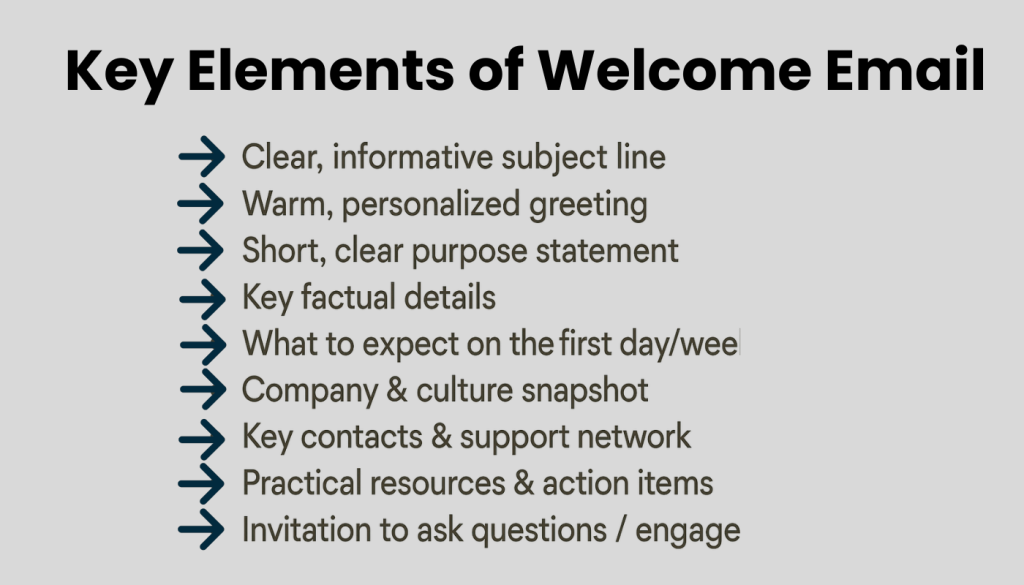
➡️ Clear, informative subject line
➡️ Warm, personalized greeting
➡️ Short, clear purpose statement
➡️ Key factual details
➡️ What to expect on the first day/week
➡️ Company & culture snapshot
➡️ Key contacts & support network
➡️ Practical resources & action items
➡️ Invitation to ask questions / engage
➡️ Professional closing & signature
You can create templates, specific to various roles, and use them whenever needed with some tweaking. Also, making the best use of HR tools and software will also help create and send the right emails.
What is a new employee welcome email?
This email is a formal introductory message sent to new hires. It As part of the onboarding process. It helps the new hire feel welcome and comfortable from day one. The welcome email should ideally be sent before the first day of work
The email briefly introduces your company culture. It also shares major details the new hire’s first day. Along with any relevant attachments for the onboarding process.
Who is Responsible for Sending the Welcome Email?
Responsible HR personnel or the hiring team sends this email after the candidate has accepted the offer but before their start date. But it can also be given on the first day. That depends on how much the IT setup for the new employee is complete.
If the organization is small, with no HR manager or team, then the email can come from the department lead, the business owner, or the CEO.
10 Key elements of an effective introduction email
When emailing a new employee to onboard them, the message should be clear, friendly, motivational, and straightforward. The main points or elements you include should be consistent for all onboarded employees. But there will be some role-specific matters that will vary. A good example is the PPE, or equipment, the Electrical Engineers will need, unlike other employees.
- Clear, informative subject line
This makes the purpose clear at a glance. Write a subject line like “Welcome to [Company], [Name]!” when sending to the new hire. You can also send a New Employee Introduction email to other team members, starting with a subject line like “Meet [Name], our new [Role]” or “Welcome onboard, Mr./Ms. [Name], our new [Role].” - Warm, personalized greeting
Address the employee by name and open with a genuine, human welcome. A warm tone reduces first-day anxiety and sets a positive emotional frame. - Short, clear purpose statement
Also, add one or two sentences explaining why they’re receiving this email. You can say, “Welcome aboard, [Name]. This is to inform you about the first week with us.” - Key factual details
It is best to add the major details of their role to the welcome email. This reinforces what is expected of them in a gentle, subtle way. Points to include can be:
👉 Job title / department
👉 Start date, time and location (or login details if remote)
👉 Who to report to on day one
- What to expect on the first day/week
Include a brief outline of the first-day agenda or onboarding steps. These can be meetings, orientation sessions, or any initial tasks. This helps the new hire feel prepared and in control.
- Company & culture snapshot
A useful element you can add is a short paragraph that signals your culture and values. It helps the new hire understand the tone of the organization early. For instance, a few lines on how the company works remotely and maintains timely ins and outs so that team members can strike a good work-life balance.
- Key contacts & support network
You must provide the names, roles, and contact details of people they can reach out to (manager, HR contact, buddy/mentor). This is a key section of an introduction email that is followed by HR leaders.
- Practical resources & action items
As attachments, you can add links or files related to new hire documentation work or digital accounts. These include- Completing paperwork or forms
- Reading the employee handbook or policies
- Accessing tools (HR portal, intranet, LMS, email, social accounts, etc.)
- Any onboarding skill assessment task that you require for initial evaluation
- Invitation to ask questions / engage
Before you close, add a line explicitly encouraging them to reply or contact you with questions. This makes the message feel two-way, not just a broadcast. A common line is “Feel free to contact me for any queries or clarification. I am always available to help.” - Professional closing & signature
Close with a warm sign-off and a full email signature (name, title, department, contact info). This reinforces trust and clarity.
How to draft a welcome email template (manually + digitally)?
You can write and send your email using Gmail or your company website email. That would be the traditional way of adding a subject line, email body, and attachments. Using advanced email tools like Mailchimp helps you with more customization and email designs than traditional ones.
You may also use HR software that integrates or has built-in email clients for bulk and instant email triggers. A good example of this is People HR integration with Zapier Email. Here, you can immediately trigger an email that notifies the joining of a new employee. Everyone else on the team will know about the joining.
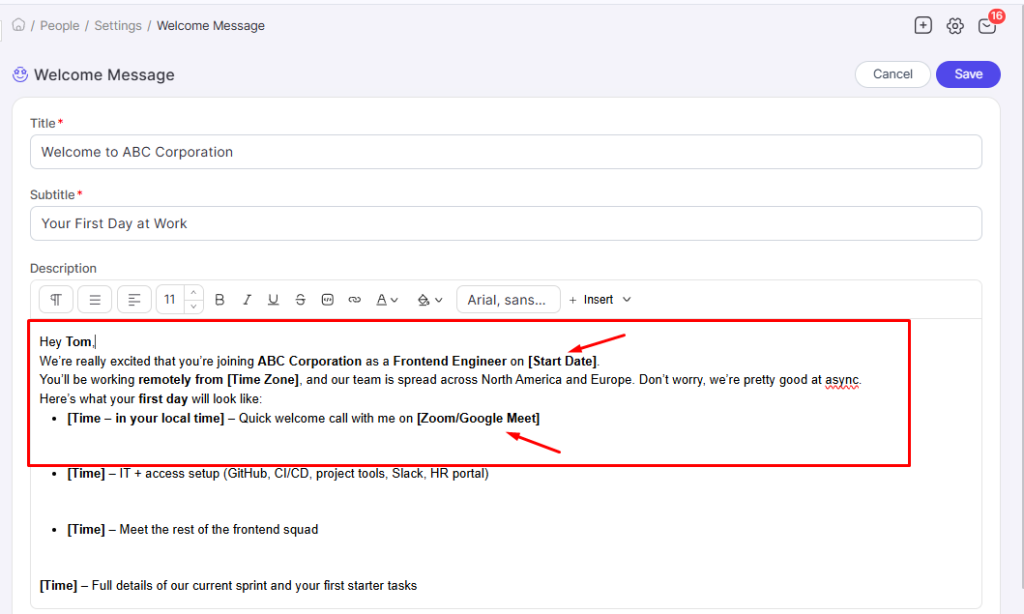
Also, you can send an email to the new joiner directly from the system when you add their profile to it. You just need to set a pre-built “Welcome Message” or customize it as a template and save it for sending.
Types of new hire welcome messages (Effective email templates)
Welcome Email formats can be of different types. Depending on the role, department, organization, location, and sender, the tones and styles vary. You need to also consider the level of communication or experience your reader, the new employee, has. A fresher would prefer an email in a more casual tone compared to a Senior Finance Manager.
If you are writing to to a Senior Finance Manager joining a US corporation, the welcome email might be as follows:
Subject: Welcome to [Corporation Name], [Mr. Last Name]! Your First Day Details
Hi Mr. [Last Name],On behalf of [Company Name], I am delighted to welcome you as our new Senior Finance Manager based in our [City, State] office. Your joining date is [Date], and your working hours will be [Start Time]–[End Time], [Days of Week]. Please report to [Reception / Floor / Office], where you will be greeted by [HR Manager Name], who will accompany you to your workstation. On your first day, you can expect: A welcome session with HR to complete remaining documentation
An introduction to your Supervisor, [Full Name], and the leadership team
IT setup for your email, finance systems, and access to our [HR/Finance software]
A walkthrough of your 30–60–90 day onboarding plan
Prior to joining, kindly log in to our Employee Portal at [Portal URL] using the credentials sent in a separate email. There, you can:Complete your personal and tax information
Review the Employee Handbook and key policies
Explore our benefits, including healthcare, retirement, and paid time off
We are confident that your expertise in financial planning, compliance, and business analysis will add significant value to our organization.Welcome onboard, [Mr. Last Name]. We look forward to working with you.Sincerely,
[HR Director Name]
Director, Human Resources
[Company Name]
[Phone] | [Email]
Again, if the email is directed toward a Retail Store Associate in the UK, the layout can be:
Subject: Welcome to the team, [First Name]!
Hi [First Name],Welcome to [Retail Store Name]. We’re glad to have you join us as a Store Associate at our [Location] branch. Start date: [Start Date]Shift time (first day): [Start–End Time]Reporting to: [Supervisor Name], Store Manager. Please arrive 10–15 minutes early and check in at the staff entrance. Bring a valid photo ID
Your right-to-work documents
Comfortable dress [dress code details]
You’ll receive your full schedule, training plan, and system login during your first shift. We’re excited to have you on the team!
Best Regards,
[HR Coordinator Name]
HR, [Company/Group Name]
What about a warm & casual message to a Frontend Engineer working remotely? I suggest it comes from the Team Lead and as follows:
Subject: So happy you’re joining our engineering team, [First Name]!
Hey [First Name],We’re really excited that you’re joining [Company Name] as a Frontend Engineer on [Start Date]. You’ll be working remotely from [Time Zone], and our team is spread across North America and Europe. Don’t worry, we’re pretty good at async. Here’s what your first day will look like:[Time – in your local time] – Quick welcome call with me on [Zoom/Google Meet]
[Time] – IT + access setup (GitHub, CI/CD, project tools, Slack, HR portal)
[Time] – Meet the rest of the frontend squad
[Time] – Full details of our current sprint and your first starter tasks
Before you start, kindly:
Log in to our employee portal at [URL]
Check your calendar for all your first-week invites
Skim through our Engineering Playbook [PDF Attached]
We believe you have strong skills in [React/CSS] and a great product mindset in our interviews. I’m excited to see your ideas shaping the experience for thousands of users.If you’ve got any questions about tools, working hours, or even which Slack channels are worth joining, just reply here! I’m happy to help. Welcome aboard, [First Name]! We can’t wait to ship great things together!
Cheers,
[Manager Name]
Engineering Manager
[Company Name]
And if its someone working in the creative field? Like a Creative Designer joining a Design Studio Startup in Australia? Try the following then:
Subject: Welcome, [First Name]! Thanks for Joining Our Story!
🎨Hi [First Name],
When we started [Studio Name] in a tiny co-working space in [City, Australia], we had one goal: ➡️ Help brands feel more human! Today you’re joining us as a creative designer, and I couldn’t be more excited. You’ll be crafting identities for clients from different Aussie territories, collaborating closely with strategists, copywriters, and developers. And help us keep our brand evolving and growing.
Just to remind you again that you’ll be directly reporting to our Creative Lead, [Full Name]. We’ll set up your tools like Figma, Canva, Adobe CC, Nifty, and MS Office within a couple of days. Meanwhile, please submit the required employment documents to our Admin Assistant, [Full Name], by today.
Our culture is simple:
👉 We give honest feedback, kindly.
👉 We protect focus time.
👉 We believe life outside work makes us better designers.
You may also have a quick look at:
Client Brand Guidelines: [Link]
Our Values & Ways of Working: [Link]
Some useful resources that will help you in your work: [Link]
Bring your eye, your taste, your curiosity, and any weird ideas you’re proud of!
Welcome to [Studio Name], [First Name]. Let’s make beautiful things together!
Warmly,
[Founder & CEO Name]
[Studio/Startup Name]
And finally, if you are sending the Welcome Email to a Fresher/Trainee Engineer Joining a Construction Firm:
Subject line: Welcome to [Construction Company Name], [First Name]
Dear [First Name],
We are pleased to have you join us as a [Job Title] in our [Project/Division Name].As you are starting your professional career with us, we want your first few days to be structured, clear, engaging, and supportive. Here are your joining details:
📅 Date of joining: [Start Date]
⏰ Reporting time: [Start Time]
📍 Reporting location: [Head Office / Site Office Address]
👤 Report to: [Project Manager / Site Engineer Name], [Designation]
On your first day, you will:
1. Meet our HR team to complete joining formalities and documentation
2. Receive an introduction to company policies, safety rules, and code of conduct
3. Be briefed on our ongoing projects and the site or department where you will be placed
4. Get an overview of your training plan and expectations during your probation period
Please bring the following documents (originals + photocopies) on your first day, if not already submitted:
-Identity documents
-Educational certificates and mark sheets
-Recent passport-size photographs
-Bank details for direct deposits
-Any other documents requested by HR
By the end of the week, you will receive your login details for attendance and other IT onboarding credentials, as per your role.
Construction is a team effort, and we value discipline, safety, and learning on the job. As a fresher, you’re not expected to know everything from day one. Your willingness to learn, ask questions, and follow safety procedures is what matters most. If you have any questions before joining, please contact [HR Contact Name] at [HR Email/Phone].We look forward to seeing you grow with our beloved firm and contributing to our projects. Best regards,
[Name]
[HR Manager / Project Manager]
[Construction Company Name]
[Contact details]
How to automate welcome emails for new employees?
Automating welcome emails is a definite win in your onboarding process. It saves time, helps reduce errors, and keeps the process consistent across all roles.
Step 1:
First, decide where the automation will take place. Options include:
- Your HR SaaS tool. Ideal if it already stores employee data and start dates.
- An ATS that will trigger the email when a candidate is moved to the “Hired” tag.
- A marketing/email automation tool integrated with your HR system
Step 2:
Next, decide when the welcome email (or sequence) should go out. Common triggers:
- When the offer is accepted.
- 3 to 7 days before the start date.
- During the first day.
Step 3:
Create standard templates that can be reused across roles and locations, then modify where needed.
You might want:
- A general HR welcome email (logins, documents, policies, benefits links)
- A manager-specific welcome email (role expectations, team intro, first-week agenda)
- Role- or region-specific variants (e.g., remote vs on-site, US vs EU vs APAC)
Step 4:
Personalize the content with dynamic fields in the system. Use the data you already store in your HR system to personalize at scale. For example, each format should have:
- Greeting with name: “Hi, [first_name],”
- Mention the role and team: “You’ll be joining us as our new [job_title] in the {{department}} team.”
- Tailor links based on location: “Here’s your local benefits overview for [country].”
The more accurate your data, the more human your automated email feels, without HR rewriting the same email 50 times.
Step 5:
Select the sender of the email, mentioned at the closing of the email. This helps boost engagement of the new hire. For example, any email that closes with the closing of the CEO adds extra value to the communication.
Step 6:
Connect your welcome emails with the system onboarding workflow. not a standalone touchpoint. Include links to:
- Employee self-service/HR portal to complete forms
- LMS or knowledge base for policies and handbooks
- Calendar invites for Day 1 orientation and team calls
If your HR SaaS tool supports it, you can trigger task assignments (“Complete banking info” and “Upload documents”) at the same time the email goes out.
Step 7:
Finally, check the email content to ensure it:
- Reflects your employer’s brand voice (formal, friendly, playful, etc.)
- Is consistent with your current policies, benefits, and processes
- Complies with local legalities (especially for multi-country setups)
A short review cycle every 6–12 months keeps the automation relevant without recreating everything from scratch.
FAQs
When should you send a welcome email?
How can an HR software help create and send welcome emails?
What key points should be in a Welcome Email for New Hires?
Summing Up
Making a new hire feel welcome from the start sets the tone for their journey with the company. And sharing an engaging, inspirational, yet simple welcome email adds value to the onboarding process. Ensuring the communication they receive about joining is worthwhile and helpful.
To improve drafting and sending emails to new joinees, you can use HR tools with integrated email clients as an effective option. But then again, you still have to know what to include in the content of the email to make an instant impact. So, make sure you always include the key elements and techniques of writing an effective introduction email in your communication.
Leave a Reply